AI Notes
Generate a timestamped editing blueprint for a video — cut points, B-roll cues, graphics, music, pacing, and retention risks — modeled on a creator style you choose.
What AI Notes does
AI Notes produces an editorial blueprint: a timestamped, scene-by-scene plan for how to edit a video. It transcribes the footage, analyzes the story, and writes out specific instructions — where to cut, where to drop B-roll, what graphics to add, how to pace each section, and where music should come in. It is a brief for an editor, not a finished render.
Picking a reference style
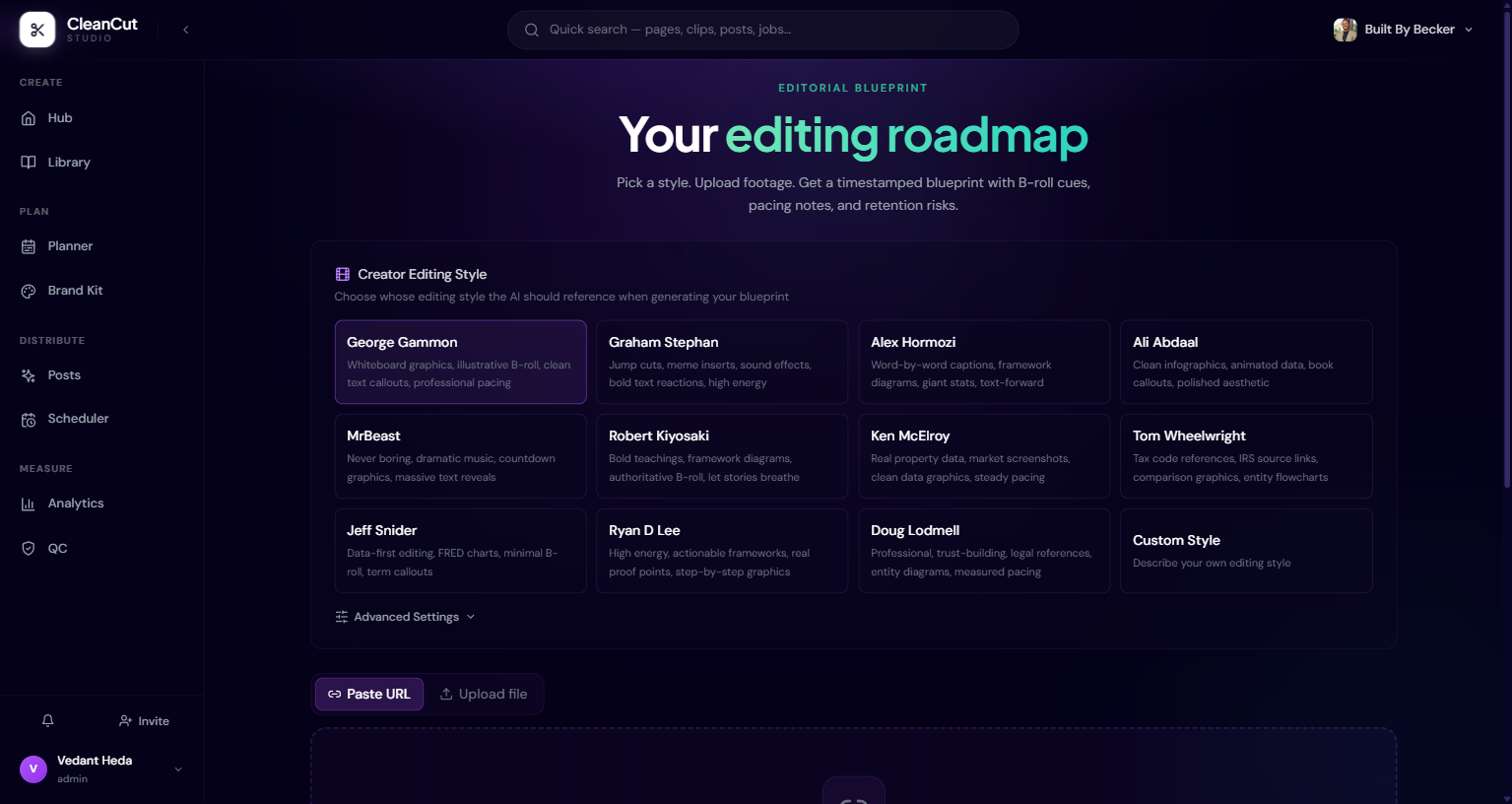
Start by choosing whose editing style the AI should reference. There are presets modeled on well-known creators, each with a short description of its feel. The blueprint is written to match that editing sensibility.
None of the presets fit? Pick Custom and describe the editing style you want in your own words.
Choosing what to include
Before you generate, toggle which kinds of notes you want. By default the blueprint covers the lot:
- B-Roll Research — search ideas and stock footage suggestions, placed at timestamps.
- Text & Graphics — title cards, lower thirds, and on-screen callouts.
- Pacing Notes — where to tighten, where to breathe.
- Music Cues — suggested beds and transitions along a timeline.
- Sound Effects — SFX moments worth punching up.
Generating the blueprint
- 1Upload a video file or paste a link (direct link, YouTube, Google Drive, Dropbox, Vimeo, or OneDrive).
- 2CleanCut transcribes it, analyzes the story structure, researches B-roll, maps pacing, and writes the instructions.
- 3Watch the live progress as it works through each stage.
- 4When it finishes, the blueprint opens with an embedded player alongside the notes.
Reading the results
The output is organized into tabs so you can focus on one layer of the edit at a time:
- Blueprint — the full list of timestamped instructions (cuts, text, transitions, zooms, and more). Filter by type, and click any timestamp to jump to it in the player.
- B-Roll — research items with stock-footage suggestions and where to place them.
- Graphics — a checklist of title cards, lower thirds, and data callouts.
- Music — a timeline of suggested music cues.
- Retention — the story architecture broken into beats, each flagged with an attention-risk level.
You can mark each instruction as done, skipped, or needs review, and jot editor notes against it. Your progress is saved locally, so it survives a page refresh. The blueprint also highlights the single strongest moment as a screenshot or quote candidate.
Applying edits and exporting
You can render a version of the video that applies the visual layers it can — text overlays, zoom effects, and graphics — at the chosen quality (Medium, High, or Ultra).
The render does not splice in actual B-roll footage or apply music and sound effects — those remain written suggestions, because the source clips and audio files are not stored. Treat B-roll, music, and SFX as a guided checklist for your edit.
The whole blueprint can also be exported as Markdown or JSON to hand off to an editor or drop into your notes.